将 NetScaler MPX 26000-50S 设备转换为 NetScaler SDX 26000-50S 设备
您可以通过新的固态硬盘 (SSD) 升级软件,将 NetScaler MPX 设备转换为 NetScaler SDX 设备。NetScaler 提供现场转换套件,用于将 NetScaler MPX 设备迁移到 SDX 设备。
此转换需要所有八个 SSD。
注意:
Citrix 建议您在开始转换过程之前配置设备的远程管理 (LOM) 端口。有关 ADC 设备 LOM 端口的更多信息,请参阅 NetScaler SDX 设备的远程管理端口。
要将 MPX 设备转换为 SDX 设备,您必须通过连接到计算机或终端的控制台电缆访问设备。连接控制台电缆之前,请将计算机或终端配置为支持以下配置:
- VT100 终端仿真
- 9600 波特
- 8 数据位
- 1 停止位
- 奇偶校验和流量控制设置为无
将控制台电缆的一端连接到设备上的 RS232 串行端口,另一端连接到计算机或终端。
注意:
要使用带 RJ-45 转换器的电缆,请将可选转换器插入控制台端口,然后将电缆连接到转换器。
连接电缆后,验证 MPX 设备的组件是否正常运行。然后,您就可以开始转换了。转换过程会修改 BIOS,安装 Citrix Hypervisor 和服务虚拟机映像,并将 NetScaler VPX 映像复制到固态硬盘。
转换过程还会为本地存储和 NetScaler VPX 存储设置一个独立磁盘冗余阵列 (RAID) 控制器。SSD 插槽 #1 和 #2 用于本地存储,SSD 插槽 #3、#4、#5、#6、#7 和 #8 用于 NetScaler VPX 存储。
转换过程完成后,修改设备的配置并应用新许可证。然后,您可以通过管理服务在现在的 NetScaler SDX 设备上预配 VPX 实例。
验证 MPX 设备组件的正常运行
- 访问控制台端口并输入管理员凭据。
-
从设备的命令行界面运行以下命令以显示序列号:
show hardware。转换后,您可能需要序列号才能登录设备。示例
> show hardware
Platform: NSMPX-26000-50S 28*CPU+256GB+4*MLX(50)+16*F2X+2*E1K+4*4-CHIP CO 520310
Manufactured on: 9/15/2020
CPU: 2400MHZ
Host Id: 1862303878
Serial no: 83WRVD62EM
Encoded serial no: 83WRVD62EM
Netscaler UUID: 258f9971-f7db-11ea-b021-00e0ed9041b6
BMC Revision: 5.03
Done
<!--NeedCopy-->
当您需要联系 Citrix® 技术支持时,序列号可能会有所帮助。
-
运行以下命令以显示活动接口的状态:
show interface示例
> show interface 1) Interface 0/1 (Gig Ethernet 10/100/1000 MBits) #8 flags=0xc020 <ENABLED, UP, UP, autoneg, HAMON, HEARTBEAT, 802.1q> MTU=1500, native vlan=1, MAC=0c:c4:7a:56:64:7e, uptime 120h29m33s Requested: media AUTO, speed AUTO, duplex AUTO, fctl OFF, throughput 0 Actual: media UTP, speed 1000, duplex FULL, fctl OFF, throughput 1000 LLDP Mode: NONE, LR Priority: 1024 RX: Pkts(1614945) Bytes(104805024) Errs(0) Drops(1601312) Stalls(0) TX: Pkts(9166) Bytes(2556380) Errs(0) Drops(0) Stalls(0) NIC: InDisc(0) OutDisc(0) Fctls(0) Stalls(0) Hangs(0) Muted(0) Bandwidth thresholds are not set. 2) Interface 0/2 (Gig Ethernet 10/100/1000 MBits) #9 flags=0x4000 <ENABLED, DOWN, down, autoneg, HAMON, HEARTBEAT, 802.1q> MTU=1500, native vlan=1, MAC=0c:c4:7a:56:64:7f, downtime 120h29m53s Requested: media AUTO, speed AUTO, duplex AUTO, fctl OFF, throughput 0 LLDP Mode: NONE, LR Priority: 1024 RX: Pkts(0) Bytes(0) Errs(0) Drops(0) Stalls(0) TX: Pkts(0) Bytes(0) Errs(0) Drops(0) Stalls(0) NIC: InDisc(0) OutDisc(0) Fctls(0) Stalls(0) Hangs(0) Muted(0) Bandwidth thresholds are not set. 3) Interface 25/1 (25G Ethernet, unknown device) #10 flags=0x4000 <ENABLED, DOWN, down, autoneg, HAMON, HEARTBEAT, 802.1q> MTU=1500, native vlan=1, MAC=00:e0:ed:90:41:bc, downtime 120h29m53s Requested: media AUTO, speed AUTO, duplex AUTO, fctl OFF, throughput 0 LLDP Mode: NONE, LR Priority: 1024 RX: Pkts(0) Bytes(0) Errs(0) Drops(0) Stalls(0) TX: Pkts(0) Bytes(0) Errs(0) Drops(0) Stalls(0) NIC: InDisc(0) OutDisc(0) Fctls(0) Stalls(0) Hangs(0) Muted(0) Bandwidth thresholds are not set. Rx Ring: Configured size=2048, Actual size=512, Type: Elastic 4) Interface 25/2 (25G Ethernet, unknown device) #11 flags=0x4000 <ENABLED, DOWN, down, autoneg, HAMON, HEARTBEAT, 802.1q> MTU=1500, native vlan=1, MAC=00:e0:ed:90:41:bd, downtime 120h29m53s Requested: media AUTO, speed AUTO, duplex AUTO, fctl OFF, throughput 0 LLDP Mode: NONE, LR Priority: 1024 RX: Pkts(0) Bytes(0) Errs(0) Drops(0) Stalls(0) TX: Pkts(0) Bytes(0) Errs(0) Drops(0) Stalls(0) NIC: InDisc(0) OutDisc(0) Fctls(0) Stalls(0) Hangs(0) Muted(0) Bandwidth thresholds are not set. Rx Ring: Configured size=2048, Actual size=512, Type: Elastic 5) Interface 25/3 (25G Ethernet, unknown device) #12 flags=0x4000 <ENABLED, DOWN, down, autoneg, HAMON, HEARTBEAT, 802.1q> MTU=1500, native vlan=1, MAC=00:e0:ed:90:41:be, downtime 120h29m53s Requested: media AUTO, speed AUTO, duplex AUTO, fctl OFF, throughput 0 LLDP Mode: NONE, LR Priority: 1024 RX: Pkts(0) Bytes(0) Errs(0) Drops(0) Stalls(0) TX: Pkts(0) Bytes(0) Errs(0) Drops(0) Stalls(0) NIC: InDisc(0) OutDisc(0) Fctls(0) Stalls(0) Hangs(0) Muted(0) Bandwidth thresholds are not set. Rx Ring: Configured size=2048, Actual size=512, Type: Elastic 6) Interface 25/4 (25G Ethernet, unknown device) #13 flags=0x4000 <ENABLED, DOWN, down, autoneg, HAMON, HEARTBEAT, 802.1q> MTU=1500, native vlan=1, MAC=00:e0:ed:90:41:bf, downtime 120h29m53s Requested: media AUTO, speed AUTO, duplex AUTO, fctl OFF, throughput 0 LLDP Mode: NONE, LR Priority: 1024 RX: Pkts(0) Bytes(0) Errs(0) Drops(0) Stalls(0) TX: Pkts(0) Bytes(0) Errs(0) Drops(0) Stalls(0) NIC: InDisc(0) OutDisc(0) Fctls(0) Stalls(0) Hangs(0) Muted(0) Bandwidth thresholds are not set. Rx Ring: Configured size=2048, Actual size=512, Type: Elastic 7) Interface 25/5 (25G Ethernet, unknown device) #14 flags=0x4000 <ENABLED, DOWN, down, autoneg, HAMON, HEARTBEAT, 802.1q> MTU=1500, native vlan=1, MAC=00:e0:ed:90:41:f2, downtime 120h29m53s Requested: media AUTO, speed AUTO, duplex AUTO, fctl OFF, throughput 0 LLDP Mode: NONE, LR Priority: 1024 RX: Pkts(0) Bytes(0) Errs(0) Drops(0) Stalls(0) TX: Pkts(0) Bytes(0) Errs(0) Drops(0) Stalls(0) NIC: InDisc(0) OutDisc(0) Fctls(0) Stalls(0) Hangs(0) Muted(0) Bandwidth thresholds are not set. Rx Ring: Configured size=2048, Actual size=512, Type: Elastic 8) Interface 25/6 (25G Ethernet, unknown device) #15 flags=0x4000 <ENABLED, DOWN, down, autoneg, HAMON, HEARTBEAT, 802.1q> MTU=1500, native vlan=1, MAC=00:e0:ed:90:41:f3, downtime 120h29m53s Requested: media AUTO, speed AUTO, duplex AUTO, fctl OFF, throughput 0 LLDP Mode: NONE, LR Priority: 1024 RX: Pkts(0) Bytes(0) Errs(0) Drops(0) Stalls(0) TX: Pkts(0) Bytes(0) Errs(0) Drops(0) Stalls(0) NIC: InDisc(0) OutDisc(0) Fctls(0) Stalls(0) Hangs(0) Muted(0) Bandwidth thresholds are not set. Rx Ring: Configured size=2048, Actual size=512, Type: Elastic 9) Interface 25/7 (25G Ethernet, unknown device) #16 flags=0x4000 <ENABLED, DOWN, down, autoneg, HAMON, HEARTBEAT, 802.1q> MTU=1500, native vlan=1, MAC=00:e0:ed:90:41:f4, downtime 120h29m53s Requested: media AUTO, speed AUTO, duplex AUTO, fctl OFF, throughput 0 LLDP Mode: NONE, LR Priority: 1024 RX: Pkts(0) Bytes(0) Errs(0) Drops(0) Stalls(0) TX: Pkts(0) Bytes(0) Errs(0) Drops(0) Stalls(0) NIC: InDisc(0) OutDisc(0) Fctls(0) Stalls(0) Hangs(0) Muted(0) Bandwidth thresholds are not set. Rx Ring: Configured size=2048, Actual size=512, Type: Elastic 10) Interface 25/8 (25G Ethernet, unknown device) #17 flags=0x4000 <ENABLED, DOWN, down, autoneg, HAMON, HEARTBEAT, 802.1q> MTU=1500, native vlan=1, MAC=00:e0:ed:90:41:f5, downtime 120h30m00s Requested: media AUTO, speed AUTO, duplex AUTO, fctl OFF, throughput 0 LLDP Mode: NONE, LR Priority: 1024 RX: Pkts(0) Bytes(0) Errs(0) Drops(0) Stalls(0) TX: Pkts(0) Bytes(0) Errs(0) Drops(0) Stalls(0) NIC: InDisc(0) OutDisc(0) Fctls(0) Stalls(0) Hangs(0) Muted(0) Bandwidth thresholds are not set. Rx Ring: Configured size=2048, Actual size=512, Type: Elastic 11) Interface 25/9 (25G Ethernet, unknown device) #2 flags=0x4000 <ENABLED, DOWN, down, autoneg, HAMON, HEARTBEAT, 802.1q> MTU=1500, native vlan=1, MAC=00:e0:ed:90:41:b4, downtime 120h30m00s Requested: media AUTO, speed AUTO, duplex AUTO, fctl OFF, throughput 0 LLDP Mode: NONE, LR Priority: 1024 RX: Pkts(0) Bytes(0) Errs(0) Drops(0) Stalls(0) TX: Pkts(0) Bytes(0) Errs(0) Drops(0) Stalls(0) NIC: InDisc(0) OutDisc(0) Fctls(0) Stalls(0) Hangs(0) Muted(0) Bandwidth thresholds are not set. Rx Ring: Configured size=2048, Actual size=512, Type: Elastic 12) Interface 25/10 (25G Ethernet, unknown device) #3 flags=0x4000 <ENABLED, DOWN, down, autoneg, HAMON, HEARTBEAT, 802.1q> MTU=1500, native vlan=1, MAC=00:e0:ed:90:41:b5, downtime 120h30m00s Requested: media AUTO, speed AUTO, duplex AUTO, fctl OFF, throughput 0 LLDP Mode: NONE, LR Priority: 1024 RX: Pkts(0) Bytes(0) Errs(0) Drops(0) Stalls(0) TX: Pkts(0) Bytes(0) Errs(0) Drops(0) Stalls(0) NIC: InDisc(0) OutDisc(0) Fctls(0) Stalls(0) Hangs(0) Muted(0) Bandwidth thresholds are not set. Rx Ring: Configured size=2048, Actual size=512, Type: Elastic 13) Interface 25/11 (25G Ethernet, unknown device) #0 flags=0x4000 <ENABLED, DOWN, down, autoneg, HAMON, HEARTBEAT, 802.1q> MTU=1500, native vlan=1, MAC=00:e0:ed:90:41:b6, downtime 120h30m00s Requested: media AUTO, speed AUTO, duplex AUTO, fctl OFF, throughput 0 LLDP Mode: NONE, LR Priority: 1024 RX: Pkts(0) Bytes(0) Errs(0) Drops(0) Stalls(0) TX: Pkts(0) Bytes(0) Errs(0) Drops(0) Stalls(0) NIC: InDisc(0) OutDisc(0) Fctls(0) Stalls(0) Hangs(0) Muted(0) Bandwidth thresholds are not set. Rx Ring: Configured size=2048, Actual size=512, Type: Elastic 14) Interface 25/12 (25G Ethernet, unknown device) #1 flags=0x4000 <ENABLED, DOWN, down, autoneg, HAMON, HEARTBEAT, 802.1q> MTU=1500, native vlan=1, MAC=00:e0:ed:90:41:b7, downtime 120h30m00s Requested: media AUTO, speed AUTO, duplex AUTO, fctl OFF, throughput 0 LLDP Mode: NONE, LR Priority: 1024 RX: Pkts(0) Bytes(0) Errs(0) Drops(0) Stalls(0) TX: Pkts(0) Bytes(0) Errs(0) Drops(0) Stalls(0) NIC: InDisc(0) OutDisc(0) Fctls(0) Stalls(0) Hangs(0) Muted(0) Bandwidth thresholds are not set. Rx Ring: Configured size=2048, Actual size=512, Type: Elastic 15) Interface 25/13 (25G Ethernet, unknown device) #6 flags=0x4000 <ENABLED, DOWN, down, autoneg, HAMON, HEARTBEAT, 802.1q> MTU=1500, native vlan=1, MAC=00:e0:ed:90:41:ee, downtime 120h30m00s Requested: media AUTO, speed AUTO, duplex AUTO, fctl OFF, throughput 0 LLDP Mode: NONE, LR Priority: 1024 RX: Pkts(0) Bytes(0) Errs(0) Drops(0) Stalls(0) TX: Pkts(0) Bytes(0) Errs(0) Drops(0) Stalls(0) NIC: InDisc(0) OutDisc(0) Fctls(0) Stalls(0) Hangs(0) Muted(0) Bandwidth thresholds are not set. Rx Ring: Configured size=2048, Actual size=512, Type: Elastic 16) Interface 25/14 (25G Ethernet, unknown device) #7 flags=0x4000 <ENABLED, DOWN, down, autoneg, HAMON, HEARTBEAT, 802.1q> MTU=1500, native vlan=1, MAC=00:e0:ed:90:41:ef, downtime 120h30m00s Requested: media AUTO, speed AUTO, duplex AUTO, fctl OFF, throughput 0 LLDP Mode: NONE, LR Priority: 1024 RX: Pkts(0) Bytes(0) Errs(0) Drops(0) Stalls(0) TX: Pkts(0) Bytes(0) Errs(0) Drops(0) Stalls(0) NIC: InDisc(0) OutDisc(0) Fctls(0) Stalls(0) Hangs(0) Muted(0) Bandwidth thresholds are not set. Rx Ring: Configured size=2048, Actual size=512, Type: Elastic 17) Interface 25/15 (25G Ethernet, unknown device) #4 flags=0x4000 <ENABLED, DOWN, down, autoneg, HAMON, HEARTBEAT, 802.1q> MTU=1500, native vlan=1, MAC=00:e0:ed:90:41:f0, downtime 120h30m00s Requested: media AUTO, speed AUTO, duplex AUTO, fctl OFF, throughput 0 LLDP Mode: NONE, LR Priority: 1024 RX: Pkts(0) Bytes(0) Errs(0) Drops(0) Stalls(0) TX: Pkts(0) Bytes(0) Errs(0) Drops(0) Stalls(0) NIC: InDisc(0) OutDisc(0) Fctls(0) Stalls(0) Hangs(0) Muted(0) Bandwidth thresholds are not set. Rx Ring: Configured size=2048, Actual size=512, Type: Elastic 18) Interface 25/16 (25G Ethernet, unknown device) #5 flags=0x4000 <ENABLED, DOWN, down, autoneg, HAMON, HEARTBEAT, 802.1q> MTU=1500, native vlan=1, MAC=00:e0:ed:90:41:f1, downtime 120h30m00s Requested: media AUTO, speed AUTO, duplex AUTO, fctl OFF, throughput 0 LLDP Mode: NONE, LR Priority: 1024 RX: Pkts(0) Bytes(0) Errs(0) Drops(0) Stalls(0) TX: Pkts(0) Bytes(0) Errs(0) Drops(0) Stalls(0) NIC: InDisc(0) OutDisc(0) Fctls(0) Stalls(0) Hangs(0) Muted(0) Bandwidth thresholds are not set. Rx Ring: Configured size=2048, Actual size=512, Type: Elastic 19) Interface 50/1 (mce Ethernet, unknown device) #20 flags=0xc020 <ENABLED, UP, UP, autoneg, HAMON, HEARTBEAT, 802.1q> MTU=9216, native vlan=1, MAC=24:8a:07:a4:91:0c, uptime 99h59m54s Requested: media AUTO, speed AUTO, duplex AUTO, fctl OFF, throughput 0 Actual: media UTP, speed 50000, duplex FULL, fctl OFF, throughput 50000 LLDP Mode: NONE, LR Priority: 1024 RX: Pkts(215681) Bytes(11431096) Errs(0) Drops(215680) Stalls(0) TX: Pkts(131) Bytes(5516) Errs(0) Drops(0) Stalls(0) NIC: InDisc(0) OutDisc(0) Fctls(0) Stalls(0) Hangs(0) Muted(0) Bandwidth thresholds are not set. 20) Interface 50/2 (mce Ethernet, unknown device) #21 flags=0xc020 <ENABLED, UP, UP, autoneg, HAMON, HEARTBEAT, 802.1q> MTU=1500, native vlan=1, MAC=24:8a:07:a4:91:0d, uptime 100h00m22s Requested: media AUTO, speed AUTO, duplex AUTO, fctl OFF, throughput 0 Actual: media UTP, speed 50000, duplex FULL, fctl OFF, throughput 50000 LLDP Mode: NONE, LR Priority: 1024 RX: Pkts(313720) Bytes(17365302) Errs(0) Drops(312232) Stalls(0) TX: Pkts(114) Bytes(4788) Errs(0) Drops(0) Stalls(0) NIC: InDisc(0) OutDisc(0) Fctls(0) Stalls(0) Hangs(0) Muted(0) Bandwidth thresholds are not set. 21) Interface 50/3 (100G Ethernet) #18 flags=0x4000 <ENABLED, DOWN, down, autoneg, HAMON, HEARTBEAT, 802.1q> MTU=1500, native vlan=1, MAC=24:8a:07:a4:91:00, downtime 120h30m07s Requested: media AUTO, speed AUTO, duplex AUTO, fctl OFF, throughput 0 LLDP Mode: NONE, LR Priority: 1024 RX: Pkts(0) Bytes(0) Errs(0) Drops(0) Stalls(0) TX: Pkts(0) Bytes(0) Errs(0) Drops(0) Stalls(0) NIC: InDisc(0) OutDisc(0) Fctls(0) Stalls(0) Hangs(0) Muted(0) Bandwidth thresholds are not set. 22) Interface 50/4 (100G Ethernet) #19 flags=0x4000 <ENABLED, DOWN, down, autoneg, HAMON, HEARTBEAT, 802.1q> MTU=1500, native vlan=1, MAC=24:8a:07:a4:91:01, downtime 120h30m07s Requested: media AUTO, speed AUTO, duplex AUTO, fctl OFF, throughput 0 LLDP Mode: NONE, LR Priority: 1024 RX: Pkts(0) Bytes(0) Errs(0) Drops(0) Stalls(0) TX: Pkts(0) Bytes(0) Errs(0) Drops(0) Stalls(0) NIC: InDisc(0) OutDisc(0) Fctls(0) Stalls(0) Hangs(0) Muted(0) Bandwidth thresholds are not set. 23) Interface LO/1 (Netscaler Loopback interface) #22 flags=0x20008020 <ENABLED, UP, UP> MTU=9216, native vlan=1, MAC=0c:c4:7a:56:64:7e, uptime 120h30m01s LLDP Mode: NONE, LR Priority: 1024 RX: Pkts(611167959) Bytes(89143315781) Errs(0) Drops(0) Stalls(0) TX: Pkts(1207140213) Bytes(120806672260) Errs(0) Drops(0) Stalls(0) Bandwidth thresholds are not set. Done > <!--NeedCopy--> -
在
show interface命令的输出中,验证所有接口均已启用,并且每个接口的状态都显示为 UP/UP。注意:
-
仅当电缆连接到接口时,接口状态才会显示为 UP/UP。
-
如果每个端口都没有 SFP+ 收发器,请分阶段验证接口。检查第一组接口后,拔下 SFP+ 收发器并将其插入下一组端口。
-
-
对每个未处于 UP/UP 状态的接口运行以下命令:
enable interface 50/x其中 x 是新的接口编号。> enable interface 50/1 Done > enable interface 50/2 Done > enable interface 50/3 Done > enable interface 50/4 Done <!--NeedCopy--> -
运行以下命令以验证电源状态是否正常:
stat system –detail
示例
> stat system -detail

Citrix ADC Executive View

System Information:
Up since    Wed Jan 20 21:35:18 2021
Up since(Local) Wed Jan 20 21:35:18 2021
Memory usage (MB)               5802
InUse Memory (%)                2.52
Number of CPUs                    15

System Health Statistics (Standard):
CPU 0 Core Voltage (Volts)                  1.80
CPU 1 Core Voltage (Volts)                  1.80
Main 3.3 V Supply Voltage                   3.35
Standby 3.3 V Supply Voltage                    3.25
+5.0 V Supply Voltage                           5.03
+12.0 V Supply Voltage                         12.13
Battery Voltage (Volts)                         2.98
Intel CPU Vtt Power(Volts)                      0.00
5V Standby Voltage(Volts)                   4.97
Voltage Sensor2(Volts)                      0.00
CPU Fan 0 Speed (RPM)                       3100
CPU Fan 1 Speed (RPM)                       3100
System Fan Speed (RPM)                      3100
System Fan 1 Speed (RPM)                    3100
System Fan 2 Speed (RPM)                    3100
CPU 0 Temperature (Celsius)                       47
CPU 1 Temperature (Celsius)                       51
Internal Temperature (Celsius)                    35
Power supply 1 status                         NORMAL
Power supply 2 status                         NORMAL
Power supply 3 status              NOT SUPPORTED
Power supply 4 status              NOT SUPPORTED

System Disk Statistics:
/flash Size (MB)                               23801
/flash Used (MB)                                 787
/flash Available (MB)                          21110
/flash Used (%)                                    3
/var Size (MB)                                341167
/var Used (MB)                                112391
/var Available (MB)                           201482
/var Used (%)                                     35

System Health Statistics(Auxiliary):
Voltage 0 (Volts)                           1.20
Voltage 1 (Volts)                           1.20
Voltage 2 (Volts)                           1.21
Voltage 3 (Volts)                           1.20
Voltage 4 (Volts)                           1.54
Voltage 5 (Volts)                           0.00
Voltage 6 (Volts)                           0.00
Voltage 7 (Volts)                           0.00
Fan 0 Speed (RPM)                           3200
Fan 1 Speed (RPM)                              0
Fan 2 Speed (RPM)                              0
Fan 3 Speed (RPM)                              0
Temperature 0 (Celsius)                       27
Temperature 1 (Celsius)                       38
Temperature 2 (Celsius)                        0
Temperature 3 (Celsius)                        0
 Done
>
<!--NeedCopy-->
-
运行以下命令以生成系统配置数据和统计信息的 tar 包:
show techsupport示例
> show techsupport

showtechsupport data collector tool - $Revision$!
NetScaler version 13.0
The NS IP of this box is 10.217.206.43
This is not HA configuration
Copying selected configuration files ....
Running shell commands ....
Running CLI show commands ....
Collecting ns running configuration....
Collecting running gslb configuration....
Running CLI stat commands ....
Running vtysh commands ....
Copying newnslog files ....
Copying core files from /var/core ....
Copying core files from /var/crash ....
Copying GSLB location database files ....
Copying GSLB auto sync log files ....
Copying Safenet Gateway log files ....
Copying messages, ns.log, dmesg and other log files ....
Creating archive ....
/var/tmp/support/support.tgz  ---- points to ---> /var/tmp/support/collector_P_10.217.206.43_5Dec2020_05_32.tar.gz

showtechsupport script took 1 minute(s) and 17 second(s) to execute.
Done
<!--NeedCopy-->
注意
命令输出位于
/var/tmp/support/collector_<IP_address>_P_<date>.tar.gz文件中。将此文件复制到另一台计算机以供将来参考。当您需要联系 Citrix 技术支持时,命令输出可能会有所帮助。 -
在命令行界面中,切换到 shell 提示符。键入:
shell示例
> shell Copyright (c) 1992-2013 The FreeBSD Project. Copyright (c) 1979, 1980, 1983, 1986, 1988, 1989, 1991, 1992, 1993, 1994 The Regents of the University of California. All rights reserved. root@ns# <!--NeedCopy--> -
运行以下命令以验证设备的内存:
root@ns# grep "memory" /var/nslog/dmesg.boot示例
root@ns# grep "memory" /var/nslog/dmesg.boot real memory = 274877906944 (262144 MB) avail memory = 264024535040 (251793 MB) root@ns# <!--NeedCopy--> -
运行以下命令以根据您的设备验证 CPU 核心数:
root@ns# grep "cpu" /var/nslog/dmesg.boot示例
root@ns# grep "cpu" /var/nslog/dmesg.boot cpu0 (BSP): APIC ID: 0 cpu1 (AP): APIC ID: 2 cpu2 (AP): APIC ID: 4 cpu3 (AP): APIC ID: 6 cpu4 (AP): APIC ID: 8 cpu5 (AP): APIC ID: 10 cpu6 (AP): APIC ID: 12 cpu7 (AP): APIC ID: 16 cpu8 (AP): APIC ID: 18 cpu9 (AP): APIC ID: 20 cpu10 (AP): APIC ID: 22 cpu11 (AP): APIC ID: 24 cpu12 (AP): APIC ID: 26 cpu13 (AP): APIC ID: 28 cpu14 (AP): APIC ID: 32 cpu15 (AP): APIC ID: 34 cpu16 (AP): APIC ID: 36 cpu17 (AP): APIC ID: 38 cpu18 (AP): APIC ID: 40 cpu19 (AP): APIC ID: 42 cpu20 (AP): APIC ID: 44 cpu21 (AP): APIC ID: 48 cpu22 (AP): APIC ID: 50 cpu23 (AP): APIC ID: 52 cpu24 (AP): APIC ID: 54 cpu25 (AP): APIC ID: 56 cpu26 (AP): APIC ID: 58 cpu27 (AP): APIC ID: 60 cpu0: <ACPI CPU> on acpi0 cpu1: <ACPI CPU> on acpi0 cpu2: <ACPI CPU> on acpi0 cpu3: <ACPI CPU> on acpi0 cpu4: <ACPI CPU> on acpi0 cpu5: <ACPI CPU> on acpi0 cpu6: <ACPI CPU> on acpi0 cpu7: <ACPI CPU> on acpi0 cpu8: <ACPI CPU> on acpi0 cpu9: <ACPI CPU> on acpi0 cpu10: <ACPI CPU> on acpi0 cpu11: <ACPI CPU> on acpi0 cpu12: <ACPI CPU> on acpi0 cpu13: <ACPI CPU> on acpi0 cpu14: <ACPI CPU> on acpi0 cpu15: <ACPI CPU> on acpi0 cpu16: <ACPI CPU> on acpi0 cpu17: <ACPI CPU> on acpi0 cpu18: <ACPI CPU> on acpi0 cpu19: <ACPI CPU> on acpi0 cpu20: <ACPI CPU> on acpi0 cpu21: <ACPI CPU> on acpi0 cpu22: <ACPI CPU> on acpi0 cpu23: <ACPI CPU> on acpi0 cpu24: <ACPI CPU> on acpi0 cpu25: <ACPI CPU> on acpi0 cpu26: <ACPI CPU> on acpi0 cpu27: <ACPI CPU> on acpi0 est0: <Enhanced SpeedStep Frequency Control> on cpu0 p4tcc0: <CPU Frequency Thermal Control> on cpu0 est1: <Enhanced SpeedStep Frequency Control> on cpu1 p4tcc1: <CPU Frequency Thermal Control> on cpu1 est2: <Enhanced SpeedStep Frequency Control> on cpu2 p4tcc2: <CPU Frequency Thermal Control> on cpu2 est3: <Enhanced SpeedStep Frequency Control> on cpu3 p4tcc3: <CPU Frequency Thermal Control> on cpu3 est4: <Enhanced SpeedStep Frequency Control> on cpu4 p4tcc4: <CPU Frequency Thermal Control> on cpu4 est5: <Enhanced SpeedStep Frequency Control> on cpu5 p4tcc5: <CPU Frequency Thermal Control> on cpu5 est6: <Enhanced SpeedStep Frequency Control> on cpu6 p4tcc6: <CPU Frequency Thermal Control> on cpu6 est7: <Enhanced SpeedStep Frequency Control> on cpu7 p4tcc7: <CPU Frequency Thermal Control> on cpu7 est8: <Enhanced SpeedStep Frequency Control> on cpu8 p4tcc8: <CPU Frequency Thermal Control> on cpu8 est9: <Enhanced SpeedStep Frequency Control> on cpu9 p4tcc9: <CPU Frequency Thermal Control> on cpu9 est10: <Enhanced SpeedStep Frequency Control> on cpu10 p4tcc10: <CPU Frequency Thermal Control> on cpu10 est11: <Enhanced SpeedStep Frequency Control> on cpu11 p4tcc11: <CPU Frequency Thermal Control> on cpu11 est12: <Enhanced SpeedStep Frequency Control> on cpu12 p4tcc12: <CPU Frequency Thermal Control> on cpu12 est13: <Enhanced SpeedStep Frequency Control> on cpu13 p4tcc13: <CPU Frequency Thermal Control> on cpu13 est14: <Enhanced SpeedStep Frequency Control> on cpu14 p4tcc14: <CPU Frequency Thermal Control> on cpu14 est15: <Enhanced SpeedStep Frequency Control> on cpu15 p4tcc15: <CPU Frequency Thermal Control> on cpu15 est16: <Enhanced SpeedStep Frequency Control> on cpu16 p4tcc16: <CPU Frequency Thermal Control> on cpu16 est17: <Enhanced SpeedStep Frequency Control> on cpu17 p4tcc17: <CPU Frequency Thermal Control> on cpu17 est18: <Enhanced SpeedStep Frequency Control> on cpu18 p4tcc18: <CPU Frequency Thermal Control> on cpu18 est19: <Enhanced SpeedStep Frequency Control> on cpu19 p4tcc19: <CPU Frequency Thermal Control> on cpu19 est20: <Enhanced SpeedStep Frequency Control> on cpu20 p4tcc20: <CPU Frequency Thermal Control> on cpu20 est21: <Enhanced SpeedStep Frequency Control> on cpu21 p4tcc21: <CPU Frequency Thermal Control> on cpu21 est22: <Enhanced SpeedStep Frequency Control> on cpu22 p4tcc22: <CPU Frequency Thermal Control> on cpu22 est23: <Enhanced SpeedStep Frequency Control> on cpu23 p4tcc23: <CPU Frequency Thermal Control> on cpu23 est24: <Enhanced SpeedStep Frequency Control> on cpu24 p4tcc24: <CPU Frequency Thermal Control> on cpu24 est25: <Enhanced SpeedStep Frequency Control> on cpu25 p4tcc25: <CPU Frequency Thermal Control> on cpu25 est26: <Enhanced SpeedStep Frequency Control> on cpu26 p4tcc26: <CPU Frequency Thermal Control> on cpu26 est27: <Enhanced SpeedStep Frequency Control> on cpu27 p4tcc27: <CPU Frequency Thermal Control> on cpu27 root@ns# <!--NeedCopy--> -
运行以下命令以验证 /var 驱动器是否已挂载为
/dev/ ar0s1a: root@ns# df –h示例
root@ns# df -h Filesystem Size Used Avail Capacity Mounted on /dev/md0 422M 404M 9.1M 98% / devfs 1.0k 1.0k 0B 100% /dev procfs 4.0k 4.0k 0B 100% /proc /dev/ar0s1a 23G 6.9G 14G 32% /flash /dev/ar0s1e 333G 32G 274G 10% /var root@ns# <!--NeedCopy--> -
键入以下命令以运行 ns_hw_err.bash 脚本,该脚本用于检查潜在的硬件错误:
root@ns# ns_hw_err.bash示例
root@ns# ns_hw_err.bash
NetScaler NS13.0: Build 73.17.nc, Date: Nov 11 2020, 07:56:08   (64-bit)
platform: serial 83WRVD62EM
platform: sysid 520310 - NSMPX-26000-50S 28*CPU+256GB+4*MLX(50)+16*F2X+2*E1K+4*4-CHIP COL 8955
HDD MODEL: ar0: 434992MB <Intel MatrixRAID RAID1> status: READY

Generating the list of newnslog files to be processed...
Generating the events from newnslog files...
Checking for HDD errors...
Checking for HDD SMART errors...
Checking for Flash errors...
Checking for Mega Raid Controller errors...
Checking for SSL errors...
Checking for BIOS errors...
Checking for SMB errors...
Checking for MotherBoard errors...
Checking for CMOS errors...
        License year: 2021: OK
Checking for SFP/NIC errors...

Checking for Firmware errors...
Checking for License errors...
Checking for Undetected CPUs...
Checking for DIMM flaps...
Checking for Memory Channel errors...
Checking for LOM errors...
Checking the Power Supply Errors...
Checking for Hardware Clock errors...
Script Done.
root@ns#
<!--NeedCopy-->
重要提示: 物理断开除 LOM 端口外的所有端口,包括管理端口与网络的连接。
-
在 shell 提示符下,切换到 ADC 命令行。键入:exit
示例
root@ns# exit logout Done <!--NeedCopy--> -
运行以下命令关闭设备。系统会询问您是否要完全停止 ADC。键入:
shutdown -p now示例
> shutdown -p now
Are you sure you want to completely stop NetScaler (Y/N)? [N]:y
Done
> Dec  5 06:09:11 <auth.notice> ns shutdown: power-down by root:
Dec  5 06:09:13 <auth.emerg> ns init: Rebooting via init mechanism
Dec  5 06:09:13 <syslog.err> ns syslogd: exiting on signal 15
Dec  5 06:09:13 aslearn[1662]: before pthread_join(), task name: Aslearn_Packet_Loop_Task
Dec  5 06:09:15 aslearn[1662]: Exiting function ns_do_logging
Dec  5 06:09:15 aslearn[1662]: before pthread_join(), task name: Aslearn_WAL_Cleanup_Task
Dec  5 06:09:15 aslearn[1662]: before pthread_join(), task name: Aslearn_HA_Primary_Task
Dec  5 06:09:15 aslearn[1662]: 1662 exiting gracefully
Dec  5 06:09:18 [1672]: nsnet_tcpipconnect: connect() failed; returned -1 errno=61
qat0: qat_dev0 stopped 12 acceleration engines
pci4: Resetting device
qat1: qat_dev1 stopped 12 acceleration engines
pci6: Resetting device
qat2: qat_dev2 stopped 12 acceleration engines
pci132: Resetting device
qat3: qat_dev3 stopped 12 acceleration engines
pci134: Resetting device
Dec  5 06:09:33 init: some processes would not die; ps axl advised
reboot initiated by init with parent kernel
Waiting (max 60 seconds) for system process `vnlru' to stop...done
Waiting (max 60 seconds) for system process `bufdaemon' to stop...done
Waiting (max 60 seconds) for system process `syncer' to stop...
Syncing disks, vnodes remaining...0 0 0 done
All buffers synced.
Uptime: 1h53m18s
ixl_shutdown: lldp start 0
ixl_shutdown: lldp start 0
ixl_shutdown: lldp start 0
ixl_shutdown: lldp start 0
usbus0: Controller shutdown
uhub0: at usbus0, port 1, addr 1 (disconnected)
usbus0: Controller shutdown complete
usbus1: Controller shutdown
uhub1: at usbus1, port 1, addr 1 (disconnected)
ugen1.2: <vendor 0x8087> at usbus1 (disconnected)
uhub3: at uhub1, port 1, addr 2 (disconnected)
ugen1.3: <FTDI> at usbus1 (disconnected)
uftdi0: at uhub3, port 1, addr 3 (disconnected)
ugen1.4: <vendor 0x1005> at usbus1 (disconnected)
umass0: at uhub3, port 3, addr 4 (disconnected)
(da0:umass-sim0:0:0:0): lost device - 0 outstanding, 0 refs
(da0:umass-sim0:0:0:0): removing device entry
usbus1: Controller shutdown complete
usbus2: Controller shutdown
uhub2: at usbus2, port 1, addr 1 (disconnected)
 ugen2.2: <vendor 0x8087> at usbus2 (disconnected)
uhub4: at uhub2, port 1, addr 2 (disconnected)
ugen2.3: <vendor 0x0557> at usbus2 (disconnected)
uhub5: at uhub4, port 7, addr 3 (disconnected)
ugen2.4: <vendor 0x0557> at usbus2 (disconnected)
ukbd0: at uhub5, port 1, addr 4 (disconnected)
ums0: at uhub5, port 1, addr 4 (disconnected)
usbus2: Controller shutdown complete
ixl_shutdown: lldp start 0
ixl_shutdown: lldp start 0
ixl_shutdown: lldp start 0
ixl_shutdown: lldp start 0
acpi0: Powering system off
<!--NeedCopy-->
升级设备
要升级设备,请执行以下步骤:
- 关闭 ADC 设备电源。
-
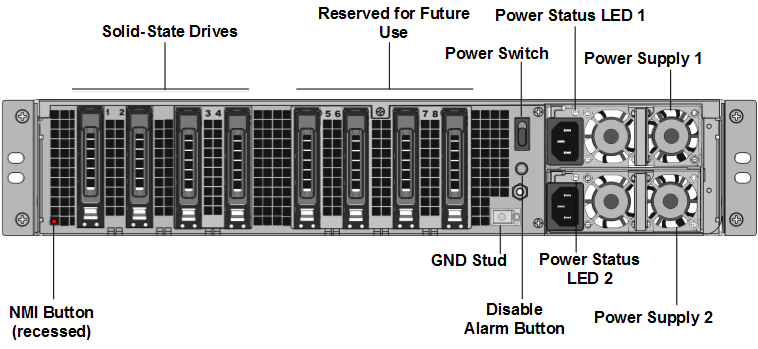
找到设备背面插槽 #1 和插槽 #2 中的两个固态硬盘 (SSD),如下图所示:
-
验证更换的固态硬盘 (SSD) 是否为您的 ADC 型号所需的硬盘。转换至少需要四个 SSD。NetScaler 标签位于其中一个 SSD 的顶部。此 SSD 预装了新版 BIOS 和所需 NetScaler SDX 管理服务的最新版本。此 SSD 必须安装在插槽 #1 中。
-
通过向下推动驱动器盖的安全闩锁,同时拉动驱动器手柄来卸下 SSD。
-
在新 Citrix 认证的 SSD 驱动器上,将驱动器手柄完全向左打开。然后将新驱动器尽可能深地插入插槽 #1。
-
要固定驱动器,请将手柄与设备的背面齐平关闭,以便驱动器牢固地锁定在插槽中。
重要提示:SSD 的方向很重要。插入驱动器时,请确保 NetScaler® 产品标签位于侧面,与已插入的 SSD 类似。
-
在插槽 #2 中插入第二个 Citrix 认证的 SSD,其容量与插槽 #1 中的 SSD 匹配。
重要提示
不支持混用新旧 SSD。插槽 #1 和插槽 #2 中的 SSD 构成第一个 RAID 对(本地存储),必须具有相同的大小和类型。同样,插槽 #3 和插槽 #4 中的 SSD 构成第二个 RAID 对(VPX 存储),必须具有相同的大小和类型。只能使用所提供转换套件中的驱动器。
-
将 960 GB 空白 SSD 驱动器插入插槽 3、4、5、6、7 和 8。
-
断开所有数据端口和管理端口的网络电缆。
-
启动 ADC 设备。有关说明,请参阅 打开设备。
转换过程可能需要长达 90 分钟,在此期间您不得对设备进行电源循环。整个转换过程可能在控制台上不可见,并且可能显示为无响应。
转换过程会更新 BIOS,安装 Citrix Hypervisor™ 和管理服务操作系统。
-
在转换过程中保持控制台电缆连接。等待过程完成,届时将出现 SDX 登录提示。
-
在转换过程中,LOM 端口连接可能会丢失,因为它会将 IP 地址重置为默认值 192.168.1.3。
-
设备从 MPX 转换为 SDX 后,Citrix Hypervisor 的默认凭据将更改为 root/nsroot。如果此密码不起作用,请尝试输入 nsroot/设备的序列号。序列号条形码位于设备的背面,也可在
show hardware命令的输出中找到。注意:
设备的序列号保持不变。
- 为确保转换成功,请验证 FVT 结果是否显示成功。运行以下命令:
tail /var/log/fvt/fvt.log
重新配置已转换的设备
转换过程完成后,设备将不再具有其以前的工作配置。因此,您只能通过使用默认 IP 地址 192.168.100.1/16 通过 Web 浏览器访问设备。在网络 192.168.0.0 上配置一台计算机,并使用交叉以太网电缆将其直接连接到设备的管理端口 (0/1)。或者,通过使用直通以太网电缆,通过网络集线器访问 NetScaler SDX 设备。使用默认凭据登录,然后执行以下操作:
- 选择仪表板选项卡。
- 验证系统资源部分是否显示了 NetScaler SDX 设备的准确 CPU 核心数、SSL 核心数和总内存。
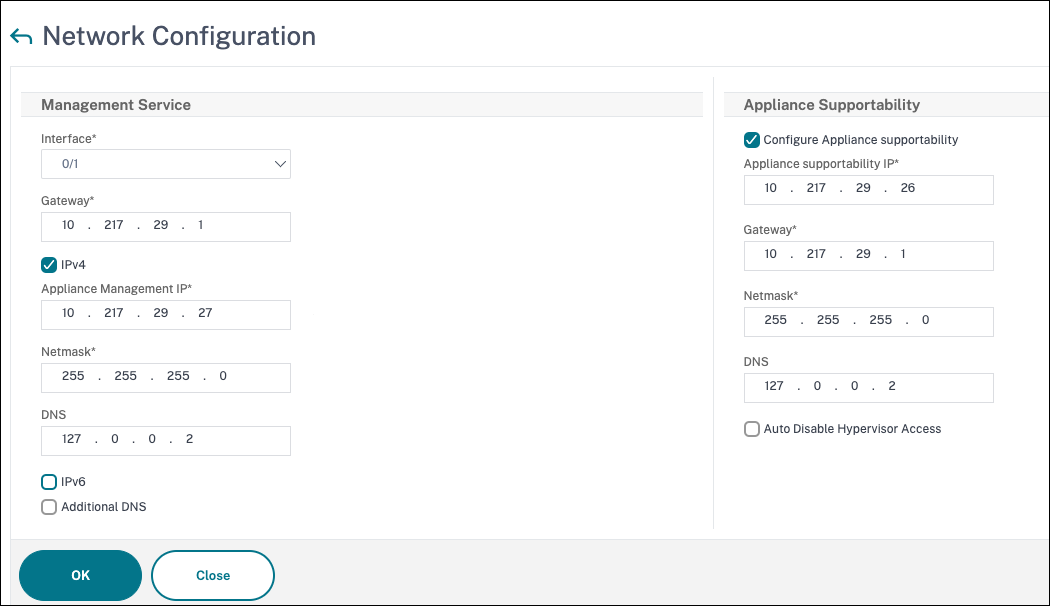
- 导航到配置 > 系统以修改管理服务的网络信息。
- 在修改网络配置对话框中,指定以下详细信息:
- 接口:将设备连接到管理工作站或网络的管理接口。可能的值:0/1、0/2。默认值:0/1。
- 网关:将流量转发到设备子网之外的路由器的 IP 地址。
- 如果要将 IPv4 地址用于管理服务,请选中 IPv4 复选框并输入以下参数的详细信息:
- 设备管理 IP:用于通过 Web 浏览器访问管理服务的 IPv4 地址。
- 子网掩码:SDX 设备所在的子网掩码。
- DNS:主 DNS 服务器的 IPv4 地址。主 DNS 服务器不支持 IPv6 地址。
- 如果您想将 IPv6 地址用于管理服务,请选中 IPv6 复选框,并输入以下参数的详细信息:
- 管理服务 IP 地址:用于通过 Web 浏览器访问管理服务的 IPv6 地址。
- 网关 IPv6 地址:将流量转发到设备子网之外的路由器的 IPv4 地址。
- 选择附加 DNS以添加除主 DNS 服务器之外的额外 DNS 服务器 IP 地址。IP 地址可以是 IPv4 或 IPv6。
-
单击确定。由于网络信息已更改,与管理服务的连接将丢失。
-
将 NetScaler SDX 设备的管理端口 0/1 连接到交换机以通过网络访问它。浏览到之前使用的 IP 地址并使用默认凭据登录。
-
应用新许可证。有关说明,请参阅SDX 许可概述。
- 导航到配置 > 系统,并在系统管理组中,单击重新启动设备。单击是以确认。您现在可以开始在 NetScaler SDX 设备上预配 VPX 实例了。有关说明,请参阅预配 NetScaler 实例。